Now that Firefox 3.0 is finally released, Mozilla has done a real good job of clearing out any mention of it from their website. Thing is, we web developers still need to test on it!
Well, after a bit of querystring hacking (simply replacing "product=firefox-3.0" with "product=firefox-2.0.0.14"), I came up with this link, which should get you what you need:
As I announced at the last few weeks' NJDOTNET Study & User Group meetings, we'll be having our very first NJDOTNET Agile meeting tonight, Thursday, June 16th starting at 6:30 PM in the Infragistics auditorium in East Windsor (the same location as the regular NJDOTNET user group meetings). Here's a little bit about the group:
Taking a cue from both the growing ALT.NET movement and quite a few members of the main NJDOTNET user group, I've decided to augment the monthly meetings of our established user group to create a more interactive, discussion-based meeting. These Open Spaces meetings will occur once a month, on the weeks following the regular User Group (the third Thursday of the month). Hopefully the addition of these meetings will allow everyone to get the benefit of a different style of interaction and learning that the “Lecture-Learn” style of the main user group cannot provide.
Way back in the time of ASP.NET MVC Preview 2 (last month), I was preparing for a presentation and decided that it would be nice to show just how simple it is to make your own View Engine. Having found David Higgins' JsonViewEngine a few days earlier, I decided to expand a little upon it and add the option to emit either XML or JSON using the same engine. After a little while, I had something looking like this that supported both:
As far as building a custom ViewEngine goes, I figure this is a great example - other than the fact that I extracted my "SerializeToXml" logic out, this is a one-method override! At first glance this (and David's) implementation may seem a little "underpowered" because of how few lines it took, but if you disassemble the System.Web.Mvc assembly or look at the MVCContrib code, you'll see that even real-world ViewEngine implementations can be this simple! I guess that's one of the nice side-effects of separation of concerns - when big things are broken up into a bunch of pieces, those pieces are usually pretty small!
As for the details of this particular example, you'll notice that it checks the RouteData dictionary (populated from the routing tables you specified elsewhere) to see if it contains "responseType" (e.g. if one of your routes was "{responseType}/{controller}/{action}" and the url that was called looked something like "/json/products/categories") and try to honor it by serializing the ViewData that was passed from the controller into the requested result. Once it has serialized the data, it just writes it directly to the Response and you're done! You could then use this View Engine to render out all the async calls all day and night, just by setting the ViewEngine property on the controller instance like so:
Simple as that, right? Well, sure... but what happens when you end up making duplicate Actions for your "normal" browser and AJAX requests that have all the same logic with the exception of that one line? The line that sets the ViewEngine is hard-coded in there, so you have to have separate Actions, right?
Enter the ActionFilter!
Wrong! After thinking about it for a minute I realized that this is the perfect place to use an ActionFilter (which was a good thing, because I just so happened to need a code example for that, too)! And so, I got to coding and came up with this guy:
As you can read about here (if you haven't already), ActionFilters are the perfect way to "inject" behaviors into your controllers. I like to compare them to the ol' Web Forms ASP.NET Page Lifecycle events such as PreInit, Init, PreRender, Render, etc. that let you plug in to the various stages of processing a request and allow you to manipulate it accordingly. For example, by overriding the OnActionExecuting method on the ActionFilterAttribute as shown above, you can plug into the request after it's reached the controller, but before any action has actually been taken on it. I believe I could have also used OnActionExecuted to accomplish the same thing since I'm only setting the ViewEngine, but that just didn't "feel" right.
Using this new custom ActionFilter, I could apply it at the Action level - or the Controller level if I wanted to apply it to all of the controller's actions - and get rid of those silly duplicate Actions. Now, instead of having the AsyncCategories Action shown above (which is assumedly just a duplicate of some other Action, perhaps called Categories) that explicitly overrides the ViewEngine with every request, I can now drop the line that sets the View Engine and let my new ActionFilter take care of setting it for me when it is appropriate! In other words, the code above now turns into the code below, which handles both "regular" and AJAX calls with the same code!
The first time I successfully saw the result of running this demo was the first time the power of ASP.NET MVC really hit me. This whole example was just a bunch of really small and straight-forward (dare I say 'simple'?) pieces that, when put together, create some really amazing and powerful results.
Grab the Code and See For Yourself!
You can see all of this stuff in action by downloading the code from my website:
I welcome any and all feedback y'all can throw my way. Enjoy!
UPDATE: As the beginning of the post says, these are what you can do with the Preview 2 bits. With the addition of the ActionResult in Preview 3 and the related methods on ActionFilter, you can actually ditch the custom ViewEngine altogether and just use the ActionFilter! Not the ActionFilter I show here, mind you, but an updated version I will show in an up-coming blog. :)
I was doing some JavaScript development earlier tonight, Googled an issue I was having and at the bottom of a blog post the author linked to a bunch of videos on Y! Video of a Douglas Crockford presentation, "The JavaScript Programming Language". These videos are - hands down - the best use of my time spent learning JavaScript ever.
The task that's been consuming my past few weekends (and a good deal of my weeknights) has been exploring various options for running various virtual machines on my desktop PCs (as opposed to my "server", which runs Gentoo Linux without debate or question). "Why?" you might ask, and for good reason, since I am continually asking myself the same thing... Even I am not sure that this is really the best route to go, but I'll try to enumerate my goals below which may shed some light on my rationale.
My Goals
Avoid the pain of dealing with pre-release software and frameworks. I've always been incredibly interested in bleeding-edge technologies and releases and being an early adopter often has its painful side-effects.
Avoid bloat. Keep it "clean and simple." I'm a minimalist and I don't like bloat. Visual Studio may be the best .NET IDE around, but it's friggin' huge! I may use it (and my other development tools) a lot, but I don't consider them part of my "core OS/tools". When I boot up, I want to be up and running as quickly as possible; and when I'm running, I don't want anything other than what I currently need (and that includes stupid OS "features") to be hogging my resources, be it CPU, RAM, or even disk space. I want to load those those in their own VM and turn them off/on when I need them; having them in their own VM also gives me the freedom to store them wherever I want and even transport them other places (like work)!
Be "Agile". The key to agility is being able to do things quickly. I also think a key part of Agile development practices is being able to not only try something just to see how it turns out, but the implied converse of easily being able to roll back to a clean environment before you tried that thing out. Applying this principle at the OS level is a very powerful concept. (This is very closely related to the first bullet-point above)
Run Linux as much and where ever possible. This one has no real logic to it - it's completely emotionally-driven. I love the idea of the power I get running Linux and I'd like to harness that power wherever possible. The downside to this (as I found out in this process) is that the UI in Linux really sucks; it's ugly to the point of un-usability. (Yes, I know function, experience, and style are very different things, but in this case style overrules them all.)
My Stabs at Success
VMWare ESX Server. This looked like the ultimate answer, since it appeared to serve all of my goals above. Unfortunately, the install for ESX didn't really go very smoothly (not to mention the fact that it was slightly, ah, "questionable" - legally speaking - to begin with...) so I gave up on it quite easily.
VMware Server on Ubuntu JeOS. I downloaded and burned a copy of this at 3 AM Saturday morning, but never installed it. Why? 'Cause I re-read its overview and saw that it is meant to run ON a VM host, not act as one! Stupid (actually, time for bed...)! Luckily I only wasted about 20 minutes and a CD downloading and burning it.
VMware Server on Ubuntu Server Edition. Well, I got everything up and running with minimal overview... Then I realized I didn't just need to host VMs... I needed to be able to "consume" them on the same machine! DOH! In retrospect, this was an incredibly blatant oversight.
VMware Server on Xubuntu. Now we're on to something! Linux host with very minimal overhead - I had the whole system up and running, hosting VMs, and running the client with only 600 Mb RAM. This was awesome, and it met all of my goals. Problem was - it met them a little too well. Sure, I wanted a minimal system to host VMs with no bloat, but the fact is, I kinda wanted some of that bloat. IM, Twitter, and even Microsoft Office are the types of things that I want available all the time and not things I want or need to virtualize. Sure, there are OSS replacements or workarounds that can handle pretty much all of my needs, but I came to the sad, sad realization that Linux as a desktop just plain sucks. It's powerful, sure - but it looks like crap, and that makes it just plain dreadful to spend most of your time in... especially in a "minimal" environment like the one I was shooting for.
VMWare Player on a trimmed-down Vista. Luckily, I was trying out all of the previous attempts on an extra HD, not actually overwriting my existing Vista install; an install which, quite honestly, I never intended to completely replace as I do play games on it occasionally. This is the solution I eventually settled for (at least for now), since it seemed the best compromise of all my goals, including those hidden ones I discovered along my journey. I'm wondering, though, if this really is the best solution... For starters - you'll notice the other solutions involve VMWare Server whilst this one uses Player. That's right - since I'm on a 64-bit machine and stupid Vista doesn't allow non-signed drivers (and for some strange reason stupid VMWare doesn't provide signed drivers for Server), I'm left with the crappy, non-feature-ridden VMWare Player. Which sucks. Oh yeah, and did I mention Vista is bloaty!?
The Bloat that is Vista
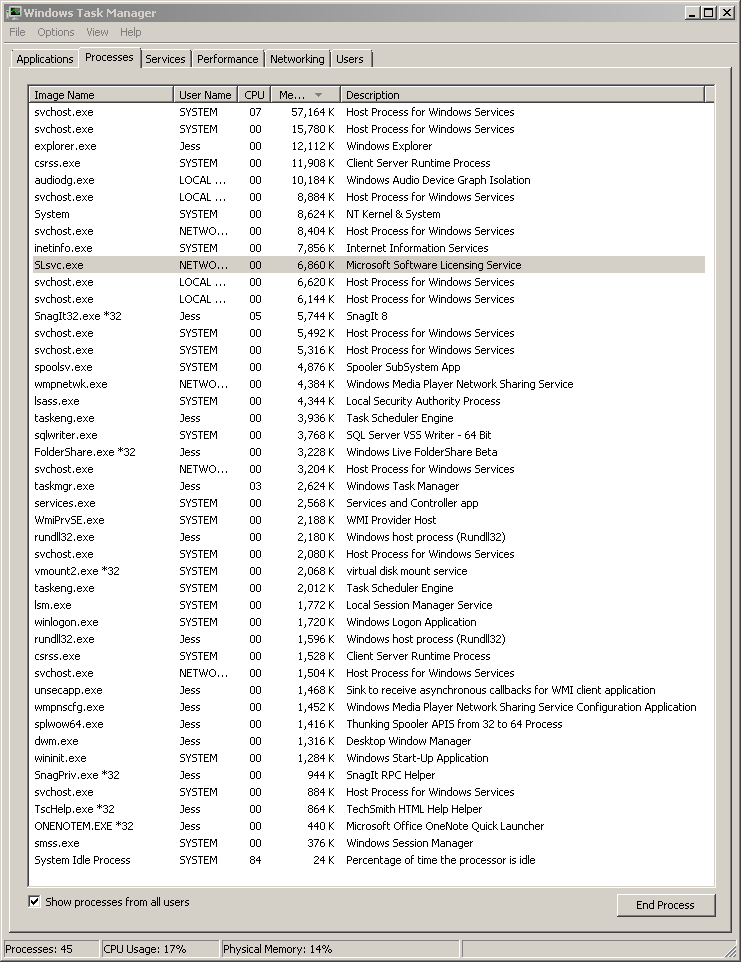
Even after I spent quite a while picking and choosing which services to kill (practically all of them - including Themes - except the bare system ones) in order to make my Vista install as lean as possible, it still took up 15% of my total 6 GB of RAM! Here's a few screenshots of my system after it's booted up before I've run anything (except SnagIt and FolderShare):
That is not my idea of "minimal", especially compared to my Xubuntu install! I don't have a screenshot of the latter, so you'll just have to trust me when I tell you - 617Mb. A fully-running system (including X & XFCE Window Manager) took 617Mb of RAM... and that was without any real attempts at minifying it any more than the default install! Now I'm left wondering what a stripped-down install of XP would look like....
So, I'm back to square one - facing the dilemma that I've been tortured with for the past 6 years since I began using Linux: suffer with the unsavory UI and awkward UX that is the Linux Desktop, or deal with the bloat that is Windows.
We had our inaugural meeting of the "NJDOTNET Spring '08 MCTS Study Group" this past Thursday, and I thought it was a wild success! I had just under 30 people register (express interest) over the past few weeks, about 5 email me before the meeting to let me know that they wouldn't be able to attend this first one (but, yes, they are very excited!), and an even 20 people actually show up. I sure am happy with those numbers! My favorite part about the whole thing is the positive energy and just raw desire to dive deep into .NET that all of the members are showing. It really is a great thing to know that you'll be able to meet up with these people (and this energy) for at least a few hours every week.
For those of you who haven't heard through the various other channels, we can still squeeze a few more members in. So, if you're interested in getting your MCTS certification in Windows Forms or ASP.NET, please feel free to let me know. We meet every Thursday night at 6:30 PM at the Infragistics headquarters just outside of Princeton, NJ. Check the NJDOTNET Website for more information, including directions.
Still wanna use all those nifty controls that you had access to back when you were developing in the Dark Ages of WebForms? Well, you can! ... sort of.
If you're like me, one of the first things you did when you started writing your first ASP.NET MVC app was say to yourself, "Hmmm... wonder what happens when I drop this TextBox control on my View?" I don't think anyone is surprised when you see something along the lines of "[...] type 'TextBox' must be placed inside a form tag with runat=server." I'm sure most seasoned ASP.NET developers have gotten this error at some point in your coding life when you're writing a new page from scratch and forget to wrap your page in that oh-so-important "<form runat='server'>" tag. What you may or may not know (I didn't realize this until I got into MVC Land and tried it) is that not all tags have this constraint. Tags such as the Image tag (and a handful of others) are just there to generate markup and don't really care whether or not they're in a form. Feel free to litter your pages with them and they should do some pretty good work for you. Unfortunately, tags like TextBox and his cronies really like the secure feeling they get by having that nice warm <form> tag wrapped around them. And - after all - things like <input> tags are "form" elements, right? It's understandable that they need the <form> tag to live.
...or do they?
The short answer is, "Yes, they do." In order to use these controls - the visual representatives of the Web Forms Way - the way that you're used to, they do need that <form> tag and all that it entails (like ViewState - ech!). However, that answer simply wasn't enough for me. When I switched over to ASP.NET MVC, I knew that I was going to lose a lot of the convenience that WebForms and ViewState gave me... but I also knew (or at least hoped!) I'd be getting rid of the problems that came with it, too. So, I'm already in that mindset when I'm working on my MVC app, but I get frustrated when I have to copy code all over the place to generate "static" HTML like image buttons and the like. Like I am with the MVC framework in general, I am more than willing to give up the advanced features of the Web Forms controls (like event handling and the like) if only I could just continue to utilize the markup they generated so well.
So, my mission was simple: I needed a way to get rid of that error message and allow these controls to generate the HTML I so desperately missed. And - lucky for me - I found a way! here's the magic:
That's it. Just overriding "VerifyRenderingInServerForm" on the ViewPage keeps the error from occurring and lets the controls try to output the markup they are tasked to.
I'll be the first to say - this works with varying degrees of success, depending heavily on which control you're trying to use and how you're trying to use it. But, hey - anything is more than you had before, right? It's a neat little trick that may end up saving you from having to duplicate some of the work that those bright folks at Microsoft have already done for you. And, it may just help you make your markup a bit cleaner.
I recently came across Phil Haack's interesting blog post and associated poll about structuring your unit test projects - do you have separate unit test assemblies or not? - and was not entirely surprised by the results. They were more or less in line what what I'd expect. At the beginning of my TDD "career" I'd actually considered for a brief second whether it'd be better to put my unit tests in line with the code they're testing (not "inline" as in the same file, but close) or in a completely separate assembly. After a few minutes of thought, I came away with what it seems most other people come away with - and emphatic "NO!" I'm honestly left wondering - and I don't mean any disdain, but - what are these 8% of "Yes" voters are thinking!? Is it laziness, or some other motive that I'm not getting? Really - I'd love to know!
I've got a test project I'm working on that uses NHibernate. In this project, I've got a Building class, which has an Address attribute, of type Address, for which I overrode the ToString() method like so:
I've also got a page that grabs a bunch of Buildings from the NHibernate session and binds them to a Repeater. For my initial tests, just to see if everything worked, I just bound right to the Address property on the Building in my markup and everything worked fine. That is, the address printed out just as it was supposed to - in just the right format I'd set in the ToString() overload. Then I went to refactor the page and break the address out into it's individual bits to show them in a slightly different way... and was greeted with a null reference exception!
I was troubleshooting for a good half hour or so before I came across this dialog:
WTF!? How in the world could my ToString() overload be generated correctly when all of its properties are null!? And then I realized - lazy loading! D'oh! I went to my NHibernate mapping file for the Building class and updated it, adding the "lazy='false'" attribute, so it ended up looking like so:
and now everything works like a charm! This fix doesn't really bother me because the Address probably shouldn't have been lazily loaded to begin with, but I never did end up figuring out how exactly that AddressProxy was able to give info to my ToString() override but was not nice enough to populate my properties for me! Looks like I've got to learn about lazy loading and NHibernate Proxy classes!
If you've got some ideas on how this happened, please leave a comment - I'd love to know! But for now, I'm just happy I figured it out!